How do flame graphs handle the case where most of the time is spent in some leaf function that is called from all over the program? In this case, each individual stack would not take much time but in aggregate, a lot of time is spent in the function at the top of all of the call stacks. This should not be that uncommon to have hotspots in things like copying routines, compression, encryption etc that are not associated with any particular stack.
Although I guess a flat text profile of functions sorted by time would also highlight these kinds of hot spots. Still, if we want a single graphical view as a go-to, it's not clear that flame graphs are all that much better than pprof DAGs.
> How do flame graphs handle the case where most of the time is spent in some leaf function that is called from all over the program?
In my experience, they don't really. They're very good for finding easy wins where a high/medium-level operation takes much longer than you'd expect it to, not so much for finding low-level hotspots in the code.
> such a view would [...] subsume the usual use cases for a flame graph, would it not?
I don't think it does. A flame graph gives you a good idea of the hierarchical structure (and quickly). Sometimes you can work that out from a DAG, but not necessarily:
Let's say that A and B call M, and M calls X and Y. All four edges have roughly the same value. A flame graph can show you that 90% of the time spent in X started with A and that 90% of the time spent in Y started with B, but the DAG can't.
I had the same experience/question at some point when I noticed (and investigated), why didn't a new Ubuntu Linux install break out interrupt usage in vmstat anymore. [1]
Perf+flamegraphs were able to catch in-interrupt-handling samples as I was on a bare metal machine with PMU counters accessible. But the various NVMe I/O completion interrupts happened all over the place, even when the CPUs were in random userspace code sections. Neither the bottom-up & top-down FlameGraph approach made it visually clear in this case.
But since interrupt time did show up and since the FlameGraph JS tool had a text search box, I searched for "interrupt" or "irq" in the search box - and the JS code highlighted all matching sections with purple color (completely distinct from the classic color range of flamegraphs). And seeing that purple color all over the place made me smile and gave me a strong visual "a-ha" moment. Probably with some extra JS tinkering, these kinds of "events scattered all over the place" scenarios could be made even clearer.
I like speedscope.app for viewing flamegraphs. It is more interactive than traditional SVG flamegraphs, and what is relevant here is a "sandwich" view - basically a sorted list of all functions, you see what function was spent the most time in, click on it and see all calling stack traces like a mini flamegraph, filtered and centered on this function. Speedscope supports several popular trace formats, really useful.
They don't. The best way to visualize that, that I've seen is the DHAT tool of Valgrind, that basically builds a trie from the roots based on how much allocations happens in them (the tool measures allocations, but the visualization could just as well be used for time spent).
Java Mission Control [0] has a button to toggle for displaying the profile as thread roots or method roots for this purpose. I am not imaginative enough to come up with a visualization that shows both (maybe utilize background color or another indicator to show the leaf function's relative frequency in the other direction?). Either way, both directions have their use case when investigating.
Not sure it's a common feature, but I've seen a flame graph tool that you can pivot around some function, so that it filters to only stacks involving that function, and then goes both up and down from there.
Just to advertise the perf tool has inbuilt flamegraph generation code these days (well leaning on D3.js). So `perf script report flamegraph` will convert a perf.data file into a flamegraph.html. Similarly there is `perf script report gecko` to write out the firefox profiler's json format.
OK, shameful confession time here: I just cannot grasp flame charts, no matter how hard I try. And yes: that's just me, I'm dumb, etc. etc. (and I freely admit all of that, including the et-ceteras!)
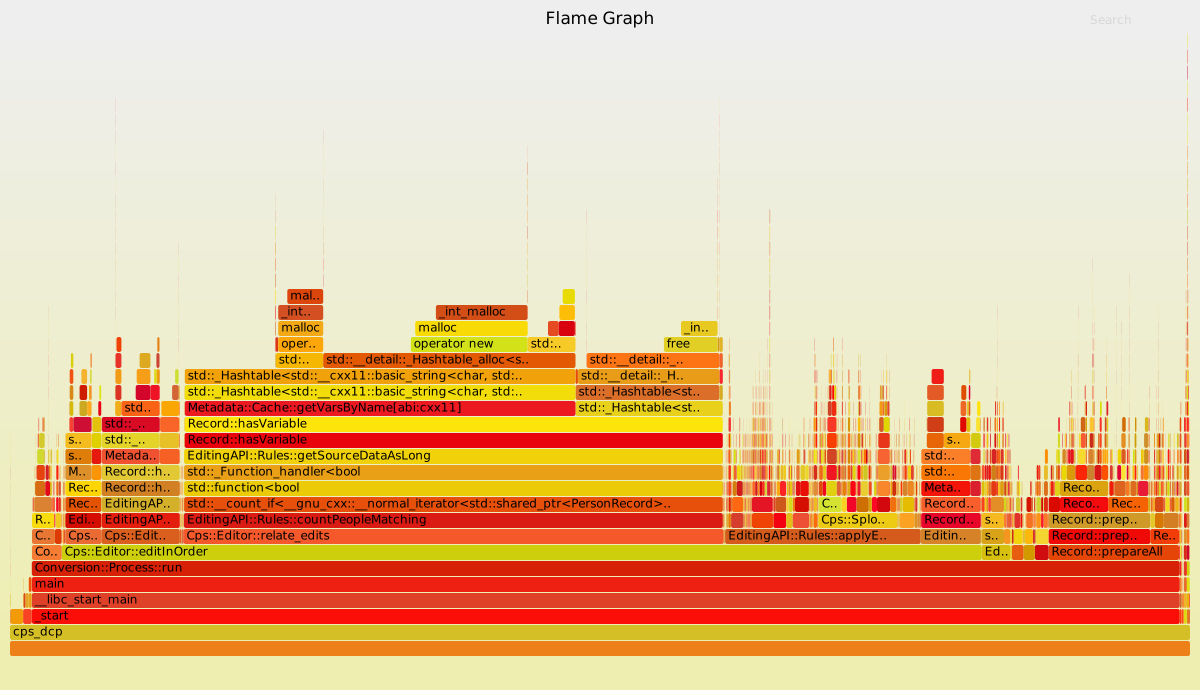
I tried to follow along with things that are relevant to my job, like https://randomascii.wordpress.com/2016/09/05/etw-flame-graph... ...And totally failed? I look at the reddest part of the chart, I look at the peaks, and none of that matches the conclusion reached in the blog post?
And then I tried to grok all the knowledge conveyed in https://www.brendangregg.com/flamegraphs.html and... came away similarly confused? Sure, I see patterns, but when asked to identify which of those patterns indicate problems, I would still score <50%?
And, I mean, I do memory/CPU traces like all day every day, and I fix code all the time based on that, but that's all just based on hierarchical bar charts, which are NOT the same as inverted flame graphs, as far as I can tell?
Anyway, thanks for coming to my therapy session, and feel free to leave your helpful-comment-that-will-finally-enlighten-me and/or downvote at the door.
> I look at the reddest part of the chart, I look at the peaks
Neither of these are really the places I look at when examining flame graphs. I tend to look at the bottom, and work my way up.
The key thing (imo) to look for are wide pieces that are not a core part of what the code you're profiling is supposed to do.
In the first example of your first link, you have a flame graph of code that seems to draw an image. There are a bunch of functions like 'CopyPixels' and 'RasterizeEdges'. Those seem to be a core part of drawing an image. In contrast, there's a 'KiPageFault' function that's pretty wide that does not seem to be important to the code's overall goal. I think a bit more context is needed to arrive at the author's conclusion, though.
I think flame graphs, like all graphs, are more helpful when the reader has a lot of context about what's supposed to happen, or some intuition about how the chart is supposed to look.
> I think flame graphs, like all graphs, are more helpful when the reader has a lot of context about what's supposed to happen, or some intuition about how the chart is supposed to look.
Yeah, and then your comment... just ends? So, what I get here is that, in a flame graph, the reddest part isn't the most interesting, and neither is the widest part, nor the part with the most peaks.
So, what, exactly, am I looking for? "You know what this graph should look like in case all was OK" is not exactly helpful, right, because I might just lack that baseline?
This can’t be answered in general. Flamegraphs are measurements of what happened. But just like a ruler doesn’t tell you whether a given human is atypically short or tall for its species, a flamegraph can’t tell you which portion of the program takes too long a time. You need to have prior knowledge about data structures, algorithms, memory bandwidth etc in order to confront your justified expectations with the reality and be surprised with something. And it will all depend on the particular program you profile.
Width in a flame graph is directly proportional to runtime. Optimizing a block that covers x% of the graph will only speed up the program by x% or less, so probably dont bother with blocks less than 0.5% wide.
This by itself should already tell you what NOT to optimize.
But really, you should be looking for operations that take a long time but shouldn't (wide blocks that should be thin). To find it you need to have an intuitive idea of how fast things should be beforehand.
If you have no idea how fast things should be, no amount of graphs will help you with this.
You're looking for a wide part for a function that you don't expect to have a wide part.
So start at the widest part and work your way up each hill. If you see a function that's still relatively wide that you think should not be wide, that's when you go look into why it's wide.
As I understand it, flame graphs add to normal x-axis-as-time ones by merging repeated calls to the same function, so if one function is called a lot it shows up as one wide chunk and not many small chunks spread out.
So yes, height doesn't matter much, you read bottom to top to get context, and width is what you're looking for.
But like any chart, it can't tell you what to optimise, or what Can be optimized. It just tells you what parts of the code are taking up the most time, in a hierarchical way. Asking for a complete description of what to see here is like asking for a complete description of what to look for in a histogram. Like, ofc it matters what the histogram is of!
> As I understand it, flame graphs add to normal x-axis-as-time ones by merging repeated calls to the same function, so if one function is called a lot it shows up as one wide chunk and not many small chunks spread out.
Not if the graph is sorted on time axis. Not if the callstacks look different in different cases. Not if the program is recursive and thus have different depth all over the place. There is a lot of places that merging can fall over and not happen.
If you sort it on a time axis, its not really a flame graph any more. The whole point of a flame graph is to group same stacks together, even if they happen at multiple disparate times.
> I do memory/CPU traces like all day every day, and I fix code all the time based on that
So I take it you understand one of the standard visualizations produced by a CPU profiling tool, e.g. it takes a call stack sample every millisecond. The x-axis is time (one sample per ms, if you have only one CPU), and the y-axis is the call stack.
Now for a flamegraph, you basically have the same visualization, but you sort the samples across the x-axis so that callstacks that start with the same prefixes are grouped together.
Incidentally, the sorting of samples across the x-axis destroys the time information which is often critical. I constantly see engineers who don't understand flamegraphs looking at the entire flamegraph of a say 3 second trace, and then trying to use that whole flamegraph to optimize a 100 ms critical path within the trace, which is totally nonsensical.
Yeah, I imagine it, and still don't see how the flame graph would help?
Shown as a hierarchical bar chart, this would suggest 'b' is problematic.
Where, color-wise (because peak-wise, 'c' would be the culprit here) do I see this issue in a flame graph? Because I fear that either 'main' or 'a' would have the most dominant shade of red here?
Peaks don't matter, they just correspond to the depth of the call stack.
Probably the simplest way to use the flame graph is work from the bottom of the flamegraph and walk upwards until you find something interesting you optimize. Ideally you find something wide to optimize that makes sense. (The widest thing here is "main" which is obviously probably not the interesting thing to optimize, so you would work upwards from there.) The basic idea is that things that are wide in the flamegraph are expensive and potential things to optimize.
Where I work, we have tools that can produce diffed flamegraphs which can be really useful in figuring out why one trace uses so much more/less CPU than another.
> Probably the simplest way to use the flame graph is work from the bottom of the flamegraph and walk upwards until you find something interesting you optimize
I work my way up. First thing that is really red is Conversion::Process::Run, but that probably wraps a lot of things, so I keep going up.
Next is Cps::Editor::relate_edits, or possibly EditingAPI::Rules::countPeopleMatching, because it's a darker red?
And then there is another red-ish function, followed(?) by some yellow-colored (and thus unimportant?) stack entries, and then the apparent culprit: Record::hasVariable.
The first function that is red being called from yellow-colored functions with about the same duration (width)? And if so, why is Metadata::Cache::getVarsByName not a more likely optimization target?
The colors are completely arbitrary! They’re just used to make it easier to see the difference between one stack and the next. They could just as easily be all the same color, it would just be harder to see the edges.
Other user here: Confession - I don't actually know what, if anything, the colors mean in a flamegraph. They seem random to me.
The way I'd personally hone in on Record::hasVariable is that it's a relatively-simple sounding function (from the name) that is taking a large portion of the X-axis. Starting at the bottom, I'd go "main -> editInOrder -> relateEdits -> countPeopleMatching -> getSourceDataAsLong -> hasVariable." Then I'd be like "we really spend 47% of our time in this simple-sounding function? What's it doing?"
Basically, I look for the functions that have an outsized complexity/time ratio. A function with a simple task is usually easier to optimize, and a function that only runs for 2% of your program isn't worth spending the time to optimize.
The solution provided in the article seems to rip out `Metadata::Cache::getVarsByName` entirely. If it were easy to optimise `Metadata::Cache::getVarsByName` instead, then that would also have been a suitable optimisation.
I guess domain knowledge and experience let them know which optimisation was more suitable here.
If you only had to look at a specific position or color in the graph, then a graph wouldn’t be needed at all. The offending function would just be printed.
But the flamegraph can’t color the offending function, or show it in a specific position, because what the offending function is depends on the context of what the program is trying to do and what the expected CPU usage for each function is. That’s information only you have.
So you only need to look at wide chunks and see if it’s expected for them to take so much share of the execution time or not, and if they can be optimized.
You often want to look at the widest stuff as close to the bottom as you have appropriate context for, then follow up by working upward from that to try to arrive at an explanation.
Some recent-ish examples:
- I was optimizing some code whose main tasks should have been networking and ML. There was a suspiciously wide chunk with a name indicating something about date times. An bit later we had a solid 10% improvement win.
- I had some code with strange behavior under load, undergoing some kind of a performance phase transition before the CPU (or other normal resources) were anywhere near maxed out. I grabbed a flamegraph under normal conditions and under load. The `main` loop was wider, but that's not helpful. Walking up the graph a little bit, next to some function the code was supposed to be calling there was a block named sched_yield which was huge and didn't exist in the normal trace. The root cause was just a strange (broken) concurrency mechanism in some underlying logging code, causing logging to pile up and hog all the resources past a certain request threshold.
The colors are a red herring. They exist just to make it easier to keep track of where you are in the graph, much like how ragged text is easier to read than justified.
Height is sometimes interesting. It represents a deep call stack. I find that happens most frequently in error handling code, and if something is called enough to make its way into a sampling-based flamegraph it's often worth taking a peek at for other reasons. Runtime is a function of width though, and height doesn't play a role.
Another point worth keeping in mind is that a lot of the benefit is in being able to quickly fine a plausible explanation for the performance issue. If you find that your application is spending most of its time in `read` calls, perhaps you'll want to do less of that, perhaps you'll want to submit a perf improvement to the kernel (unlikely?), but what you definitely want to do is look at the next level above the offending code, then the level above that, .... What you'll find depends on your application, but the difference between being slow because of locking and synchronization is very different from error handling or just executing the happy path a ton of times, and that insight will help govern your next actions.
Alright, so first of all, the colors don't matter, they're just for contrast/legend purposes. Flame graphs come in all sorts of color schemes, not even necessarily yellow/orange/red.
I tend to look at flame graphs in terms of % of the overall process. They're good for finding that one part of a routine that is taking up a decent % of processing, and if that part of the routine is being hung up on some mundane task.
For example, if I see 3/4 stacks directly on top of each other, then I know I've got a call stack a few levels deep that is overwhelmingly waiting on some low level thing to finish. If it's something that should be really fast (like a cache lookup), then I know something really stupid is happening.
Some flame graphs will tie in e.g. network requests and DB queries as their own traces, which will also give you a clue sometimes. Like, oh, this function is waiting 10s for a query to complete? Let's see what that is actually doing, maybe we can speed it up.
I used flame graphs (among other things) this year to take a 30 minute long payroll process down to about 3 minutes. Much of this was just scanning the flame graph for things high in the call stack that were taking up noticeable % of the processing time. This is easier if you know the codebase, but for example, I could see within the "load a bunch of data" phase of our processing that there were a few tax-related things taking up most of the overall time. We managed to trace those to a few calls to a third party library that we couldn't make any faster, but we could cache the results to mitigate the issue.
Another place we found expensive queries being repeated in different functions, which was obvious because we had 2 calls to the same function from both places. We ended up just raising those shared calls up a level and patching the data directly into the two functions that needed it.
Other places were less obvious. We could see a lot of time being spent, but we couldn't tell from the flame graph what was happening. We'd go look at some code and find some n^2 aggregation function that we'd need to simplify.
Overall, flame graphs are just one tool. They might not even be the best tool. In our case (heavy data driven web application) I would place DB observability at least as high in importance as good tracing, and flame graphs are just one way of visualizing traces.
You can use them pretty much the same as hierarchical bar charts - at least I do. The two things to look for are a) entries with a big flat surface on top - these are functions with a lot of intrinsic time (i.e. stuff that would show up as "most time in function" in a traditional profiler) b) entries that are wider than they should be - the things that you'd look into by repeatedly expanding the hierarchical bar chart, you can look into by going from the bottom of the flamegraph up.
For me when using a traditional profiler I often find myself switching back and forth between those two views (functions with most intrinstic time versus tree of function calls by time) and having to expand and contract different parts of that tree breakdown. So the advantage of a flamegraph is putting all that information on one page.
My problem was that I had used tools that use the x-axis for time. So you can follow program execution over time by reading the graph from left to right.
However, that is NOT how flame graphs work. At each level of stack depth the called functions are sorted alphabetically and the cumulated time spent in the function is represented as the length of the bar in x-direction. So yes, x has a notion of time or duration, but what you see is not chronologically ordered data.
Understanding that brought the breakthrough for me.
I think I'm the same as you, I much prefer the style where you get an interactive profile and can hit "show me the hot path" and it'll expand down the hot path.
The overall flame charts just don't provide the immediate "Here's what's wrong" you need from a chart.
Charts should be simple enough to quickly get an idea of whether the thing you're looking at is "Good" or "bad" and if "Bad", quickly see where the problem is.
Well, thank you for pointing out that hierarchical bar charts do a pretty good job at showing the hot path.
So my (and I guess your) workflow is then to fix the top-X hot paths, and then re-profile, etc.
The attraction of flame graphs, as I understand it, is that you can get the same information without the need to iterate. Which is obviously very valuable if you're operating on single-shot bug reports, but... how exactly? (Not a question directed at you, obviously, but more towards the general discussion)
I recommend writing your own flame graph generator, the syntax is super simple and it will help you understand the span/subspan nesting.
In some cases it's not that helpful if you don't have the right type of problem, eg I was troubleshooting some higher level stuff (SQL) and looking at stored procedure invocations and a two depth invocation doesn't tell you very much.
For me a FG is more about sounding out the problem and understanding what the scope of what is possible more than fixing an immediate and obvious issue.
The jetbrains profiler lets you quickly "Scope to X", so you can scope to the second or third highest ranked functions and see their breakdown too, so you don't need to fix the highest to get a full understanding.
I don’t know if it helps, but this is how I read through the graph from the first article after reading the authors conclusion. (I’m an idiot)
- okay, we’re analyzing DvrDrawImage
- Let’s analyze the function on the left, GpBitmap::PipeLockBits
- Up through ::Decode, takes up 100% of the time from PipeLockBits, so we’re just racing down the call stack to get to that point, and then other stuff starts taking up time
- Lots of WindowsCodecs calls, I guess we kind of expect those to be valid since image processing needs codecs and stuff and things
- Okay, now there’s a bar taking up ~45-50% of the ::Decode call, that’s not a codec or drawing related thing- it’s an os level pagefault. That’s fucky.
- Since the ::Decode call is ~55-65% of the ::DvrDrawImage call, that pagefault is (~40% of ~60% =)~25% of this draw image call
So essentially I looked and saw a stack of bars altogether and went ‘okay, the call at the top of this is the only reason the call 6 bars up the stack (ie, 6 bars down on the flamegraph) is taking time, why?’, and start applying the same process recursively from there.
That is, until $why == ‘due to codec calls and an ntkernel call’, and the question becomes ‘is that valid?’ Then the question becomes “are these codec calls taking the amount of time I would expect?”, and “
iiuc peaks and colors don’t matter. Tbf I think the colorscheming on this chart is shit- afaik flamegraph coloring is just a way of marking the same (or from the same library? Implementation dependent?) function for easy spotting. Like why not make the functions wildly different colors. Redness != hotness of a certain codepath.
The only thing peaks indicate is calls that have deeply nested function calls, which I guess would be important if you’re having recursion issues.
At least in the original form colors are randomly assigned just for visual separation. So looking for a certain color is not helpful. You should look for long bars.
(There are obviously also enhancements where colors have some semantics. I am not familiar with those.)
Did you read the linked article? It starts with a very simple example and then builds up to a real-world case, unlike the articles you linked, which both start off with an advanced case.
If so, the widest, reddest, and highest-magnitude function I see there is __int__malloc. Right?
Yet, reading on, it seems that has nothing to do with anything, and the actual culprit is Record::hasVariable, which is somewhere in the middle of the graph, and not any redder or less red, or wider or less wide, than many other functions.
So, looking at just the first graph, how am I supposed to immediately spot the culprit?
But looking at the one you're referencing, slightly out of order:
> highest-magnitude function I see there is __int__malloc.
Height shows stack depth, not magnitude.
> the actual culprit is Record::hasVariable, which is somewhere in the middle of the graph, and not any redder or less red, or wider or less wide, than many other functions.
> not any redder or less red
The colors are randomized to help with contrast (Brendan's website mentions this practice), so they aren't conveying any information.
> or wider or less wide
That's not really true. Hovering over Record::hasVariable tells that this bar covers 45.6% of the runtime. The only bars wider than that are the callers of Record::hasVariable (edit: rather, the stack through which Record::hasVariable is being called), i.e. the bars on which Record::hasVariable is resting.
> somewhere in the middle of the graph
Sure - being in the middle height-wise means that it's somewhere in the middle of the call stack. But there are some clues to its relevance:
1. It's close to the boundary between application code and standard library code. It does call MetaData::Cache::getVarsByName, which (going by the name) also is part of the application, but everything deeper in the stack (i.e. on top of those bars) is purely std:: stuff.
2. Domain knowledge. The text alludes to this: Record::hasVariable is a conceptually simple operation that's not expected to be a major part of the runtime.
This does not mean that Record::hasVariable must be the culprit. Maybe some function higher in the call stack (e.g. EditingAPI::Rules::getSourceDataAsLong) is calling Record::hasVariable way too many times? But it's a good place to start looking.
Ah, OK, so there is a graph, where magnitude is meaningless, colors are meaningless, runtime is relative, yet, with "enough domain knowledge" you can "see where the problem is right away"...
I haven’t read the article. However, here is how I read the chart:
Record::hasVariable takes a long time. You can see that because it’s wide and red. The immediate ones below it on the chart don’t do anything but call it; you can see that because they are basically the same width. hasVariable splits into two calls (the row above). I’m going from memory here because I don’t have the chart here, but I think it should be clear from the trace:
A) hasVariable takes a lot of compute time
B) from the name, this seems surprising / non optimal.
C) Digging into the functions above it will yield chances to optimize.
I do agree that the malloc is sort of a surprising amount of the total percentage of hasVariable. Again, just from the flame graph and function names, I’d bet that some memory allocations are being done in a loop inside and would be much faster to allocate outside the hasVariable call, and get reused.
As does Memdata::Cache::getVarsByName[blah] right above it, and many functions below (unsurprisingly, but still...), and they all have pretty much the same width and color.
The point of flame graph proponents is that "you see where the problem is right away."
My question is: "how, exactly?" And the answers so far seems to be mostly... lacking, to the point that I now officially declare flame graphs a cargo cult that is in no way superior to my "hierarchical bar charts" religion...
Back in 2018, I built a flame graph generator for AppDynamics APM-captured snapshots which are traces of call stacks captured over execution time with stack frame timing. Those would typically come from java or clr, although other types like node and ruby and php were also supported.
My tool could handle one snapshot or hundreds of thousands of them and it was more useful to aggregate many snapshots I used on Brandan Gregg perl script implementation as reference but wrote all the code myself from scratch to produce just what I wanted. One of the more key things I felt was different was was adding color coding of the TYPE of the call frame based off the code namespace - like green for Oracle jdbc driver or blue for websphere entry or light azure for the clr internals. With multiple contrasting colors one could see the important transitions from own code to library code and back to own code.
It was one of the most fun coding challenges I've ever done. Pretty much the only time I had to refactor recursion into stack because some of the call graphs (looking at you java) were so ridiculously deep
Do colors have any significance in those flame graphs? It's unfortunate that a post about them does not mention anything about colors. If you look at at the examples, there are bars, which have the same length, but the colors look random to me.
Yes they are random. See the blog about the inventor of the flame graph, how we know them today
> Neelakanth and Roch's visualizations used completely random colors to differentiate frames. I thought it looked nicer to narrow the color palette, and picked just warm colors initially as it explained why the CPUs were "hot" (busy). Since it resembled flames, it quickly became known as flame graphs.
For C++ applications, nothing beats Tracy’s flame graphs in value per dollar. We are using it at Adobe with great effect. It can handle mutex lock contention, runtime values and notes, arbitrary value graphs, and more. Highly recommended: https://github.com/wolfpld/tracy



pprof from https://github.com/google/pprof can produce a DAG view of a profile where nodes are sized proportional to their cumulative time, e.g., https://slcjordan.github.io/images/pprof/graphviz.png and such a view would seem to cover the case above and subsume the usual use cases for a flame graph, would it not?
Although I guess a flat text profile of functions sorted by time would also highlight these kinds of hot spots. Still, if we want a single graphical view as a go-to, it's not clear that flame graphs are all that much better than pprof DAGs.